What are custom dimensions in IES?
Custom dimensions in Intuit Enterprise Suite (IES) are flexible, transaction-level analytical tags that let you track income, expenses, and profitability by specific business segments without cluttering your chart of accounts. A custom dimension is like a class on line items.
How do I add a custom dimension in IES
Add a custom dimension called product category:
- In IES, click the gear icon.
- Select lists > dimensions.
- Create a dimension called product category with only a value called shoes.
How do I map data to custom dimensions?
You can use the Connex Ecommerce rules engine to map to custom fields on line items. In this example, we will map the phrase shoes if the product SKU contains shoes:
- Login to Connex Ecommerce.
- Click rules engine.
- Click add new rule.
- Scroll to the bottom. Check write rule without order number and click next.
- In the name field, enter Map Shoes.
- In the action field, select map custom field to QuickBooks line items.
- Click add condition and enter these values: field is Sku, comparison is equals and initial value is shoes. The rule says if the product SKU is shoes, then return true.
- In the value to which needs to be updated, enter your custom field in IES, product category.
- Click submit to make the rule.
What is the end result?
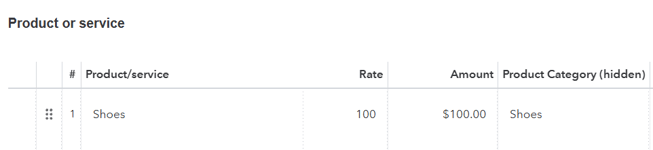
Here is the field in IES: