
Is there a demo video?
Here is a demo:
How do I create a sales order in Intuit Enterprise Suite, then close the sales order with an invoice after shipment?
Connex Ecommerce can close sales orders with invoices, after the order ships. Here are the steps:
- In Connex Ecommerce, go to settings > orders to accounting > transaction type.
- Choose sales orders, invoices, payments if paid.
- Under the manual sync tab, choose an order status. If you use Shopify, use paid and fulfilled. If you use ShipStation, enter awaiting_shipment and shipped. This tells Connex to import sales before and after shipment. Before shipment Connex will create a sales order. After shipment, Connex will create an invoice to close the sales order.
- In Connex Ecommerce, click rules engine.
- Click add new rule.
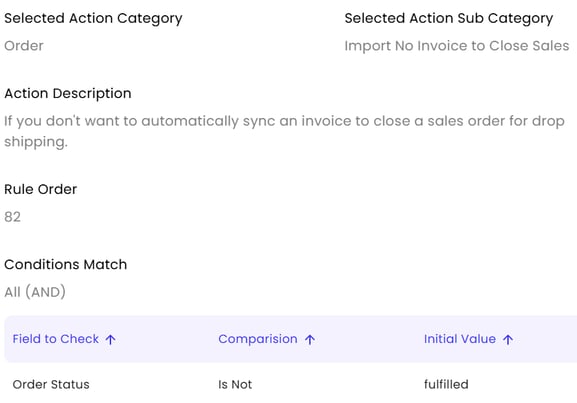
- Choose the rule template Import No Invoice to Close Sales.
The rule tells Connex to only create invoices, if the order is shipped. Here is the rule Connex Ecommerce will make:
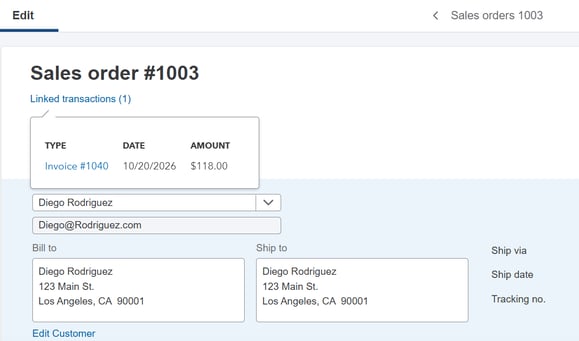
To see the invoice, open the sales order. Click linked transactions:
What if I want to create the sales order and invoice regardless of shipment status?
Ignore steps after step 2. Connex will make the sales order and invoice.
Can Connex Ecommerce create payments, after creating the invoice to close the sales order?
With the sales orders, invoices, payments if paid setting, Connex will create payments after creating the invoice. To create no payment based on a ShipStation selling channel, follow these steps:
- In Connex, go to rules engine.
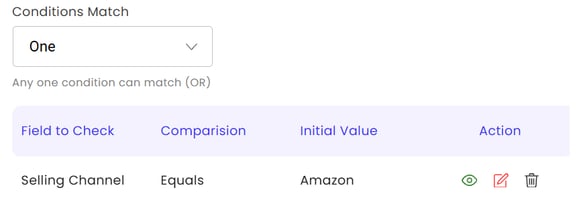
- Choose the template Mark invoice as unpaid.
- Adjust the selling channel in the rule:
- Click submit.