
Can Connex Ecommerce Sync to Unit of Measure?
Yes, Connex Ecommerce supports mapping the unit of measure field. You must set up a rule to map the field, based on business logic. Many users have product SKUs or a product title that contains a unit of measure.
How do I set up unit of measure in Intuit Enterprise Suite?
Create a unit of measure called each and assign it to the product. For step by step instructions, read this guide.
How do I map the unit of measure?
In this example, there is an order for ten pencils at $1 each. In Intuit Enterprise Suite, the pencils have a default unit of measure called each. On the order, the product description contains the phrase each. Here is an example from Shopify:
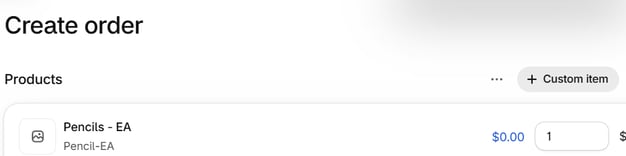
The title or SKU contains EA. We can map EA to each.
We will say if the product description contains each, then map each as the unit of measure.
- Login to Connex Ecommerce.
- Click rules engine.
- Click add a new rule.
- Select a connection.
- Scroll to the bottom and select no order number. Then, click next.
- Put in a name for the rule > Line items > Map unit of measure

- Add condition. Refer to screenshot below

- For "Value which need to be updated" enter the "each" and hit submit.

How does the order look in Intuit Enterprise Suite?
Coming soon!