How do I pair?
Here are the steps:
- Login to Connex.
- Click add channels and pair your channel.
- Under other, choose Dynamics.
- Pair Dynamics.
- Complete the set-up wizard.
What data do you sync?
We provide a two way sync of customers, products and orders.
How do products map?
Connex does not map the field Gen. Prod. Posting Group. After Connex creates products, go into the items tab of Microsoft Dynamics. Adjust the Gen. Prod. Posting Group field. We plan to fix this issue for a future release.
Connex, unless instructed, will create no new inventory parts. For discounts and shipping, this field must get assigned.
| Connex | Dynamics |
| SKU | Description |
| Type | Service |
| Unit Price | Unit Price |
| Unit Cost | Unit Cost |
Please add the base unit of measure and general prod. posting group to all products. Otherwise, Connex cannot sync them:

How do fields map?
For orders, here is a mapping:
| Connex | Dynamics |
| Billing Address | Billing Address |
| Shipping Address | Shipping Address |
| Customer name | Customer name |
| Phone | Phone |
| Line Items - SKU | Item Description |
| Line Item Quantity | Quantity |
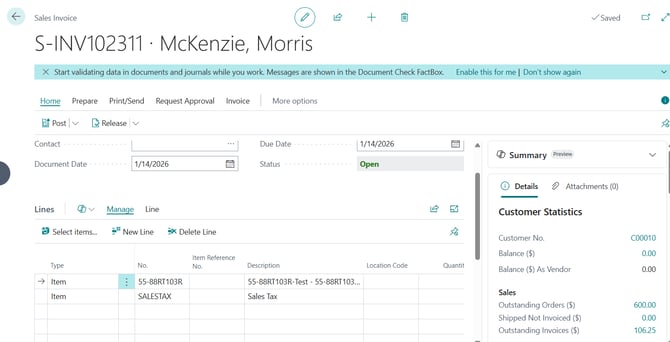
| Tax | Tax, added as a line item |
| Shipping | Shipping, added as a line item |
We can sync orders as sales invoices. Here is an order from Shopify: