
When do sales sync?
Out of box, Connex syncs Amazon sales on their purchase date. This is the date the customer ordered the product. To find the purchase date, follow these steps:
- Log into ShipStation.
- Look up the missing order.
- Review the order date field.
In this screenshot of our order previewer, you can see the purchase date of June 25th:
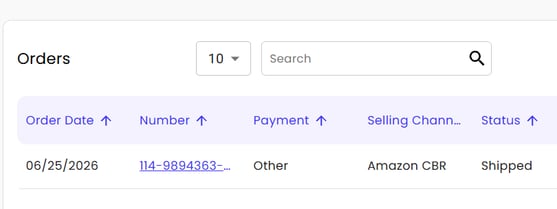
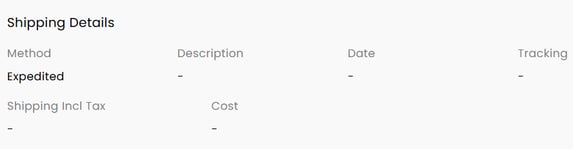
The status says shipped. If you visit the order details, there are no shipping details:
If you look at your Amazon settlement report, there is a field called posted date.
| Order ID | Fulfillment ID | Posted Date |
| 114-9894363-3329804 | AFN | July 4, 2026 |
The blank tracking number indicates the sale was shipped outside of ShipStation. Therefore, asking Connex to sync shipped sales will skip these orders. To sync these orders, follow these steps:
- Obtain the missing purchase date range. In this case, sync June 24 - June 26 to capture a larger range.
- Log into Connex.
- Click settings.
- Click orders to accounting.
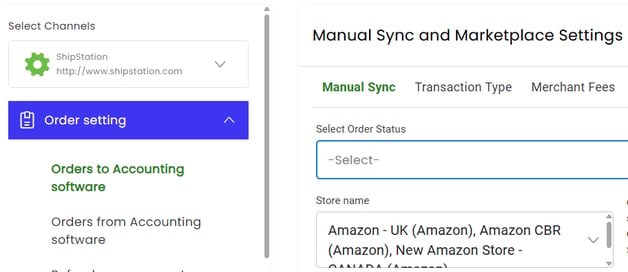
- In the drop down box for order status, leave the field blank. This instructs Connex to pull sales by their order date in ShipStation:
- In Connex, click dashboard and click manual sync.
- Enter the date range.
- Wait a few minutes.
- Check the pending queue under settings > pending > transactions.
- Search for the missing order numbers.
We recommend pulling Amazon sales by their purchase date for many reasons:
- Amazon FBA sales are shipped outside of ShipStation. There is no posted date field mapping.
- Pulling orders by their order date is a faster sync. Pulling shipped orders takes more time.
For large volumes of Amazon sales, we recommend a summary payout.