
Is there a video?
Here is the video:
How do I set up the integration?
Here are the steps:
- Login to Connex.
- Pair a selling channel.
- On the pair accounting page, choose Odoo.
- Choose sync orders from Odoo.
- Complete the install wizard.
Connex will sync sales from Odoo to ShipStation.
What syncs do you offer?
We offer a two way sync of orders. You can create an order in Odoo, sync it with ShipStation, ship it in ShipStation, and Connex will update Odoo.
How do the fields map?
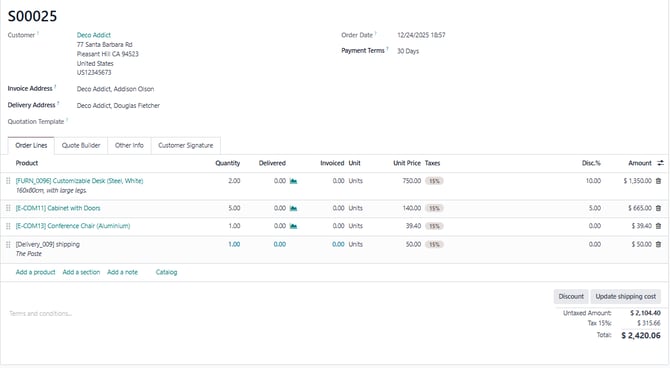
Here is a screenshot from Odoo:
Here is a screenshot from ShipStation:
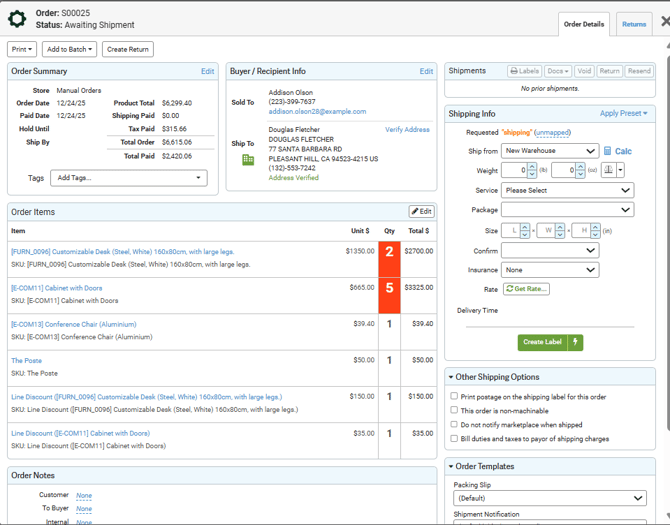
Here is a field mapping:
| Odoo | ShipStation | Notes |
| Order Number | Order Number | |
| Billing Address | Billing Address | |
| Shipping Address | Shipping Address | |
| SKU | SKU | |
| Item Name | Item Description / Name | |
| Quantity | Quantity | |
| Order Date | Order Date | |
| Unit Price | Unit Price |