![Connex_Logo_HelpCenter_100h.png]](https://help.connexecommerce.com/hs-fs/hubfs/Connex_Logo_HelpCenter_100h.png?height=50&name=Connex_Logo_HelpCenter_100h.png)
Problem
Your sales sync to QuickBooks, but the tax is wrong.
Description
You get this error in the log:
Although there is tax on order 88490, you have not associated a QuickBooks tax code. Please go to the configure page of our software, click sales tax codes, and map a code for NC. This order will sync without tax.
Connex is trying to map a tax code to the bottom of the sale, if you use QuickBooks U.S. If you use QuickBooks Canada, Connex is trying to map tax codes on line items. This error means no mapping is available.
Solutions
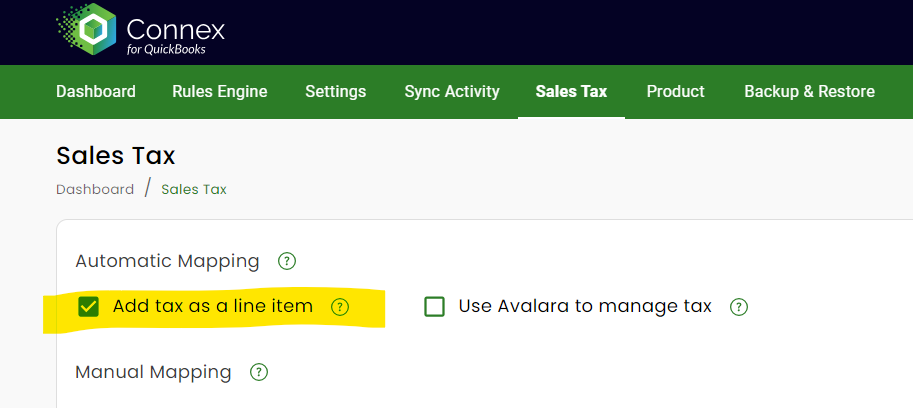
Map Tax as a Line Item
You must either add tax as a line item or map codes, if your sales have tax. If you use Avalara, you must still select map tax as a line item.
- Log into Connex.
- Click Sales tax.
- Check add tax as a line item.
- Click save.
Map Tax Code
Here are the steps:
- Log into Connex.
- Click Sales Tax
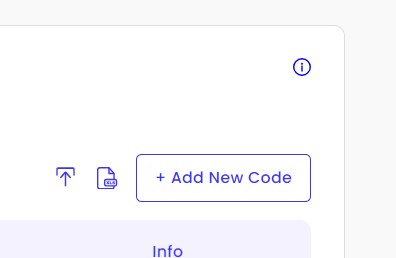
- On the right side, click Add New Code
- Enter a tax code, U.S. state if United States, and the country code.
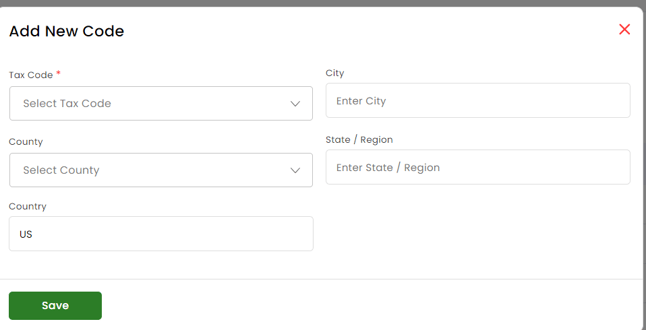
- Click submit.