![Connex_Logo_HelpCenter_100h.png]](https://help.connexecommerce.com/hs-fs/hubfs/Connex_Logo_HelpCenter_100h.png?height=50&name=Connex_Logo_HelpCenter_100h.png)
Introduction
In some cases, sales tax is applied at the city, state and county level. In this example, we will map a QuickBooks tax code based on a Shopify tax code. The sale was placed in Monterey County. We will say if Shopify applies a certain tax code, then map a QuickBooks tax code.
Create grouped tax code
You need to create a grouped tax code in QuickBooks to mimic the tax code in Shopify. Here are the steps:
- In QuickBooks, go to lists > item list.
- Click add.
- Create two new sales tax items.
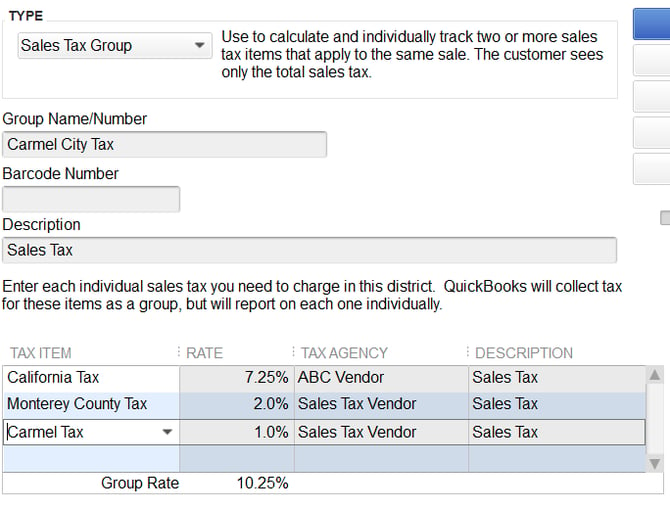
- Create a new grouped tax code called Carmel City Tax. Add the sub items:
Add Tax Mapping
You must map the tax code by county:
- Log into Connex.
- Click rules engine.
- Click order previewer.
- Choose a site and enter an order number.
- Click the eye icon.
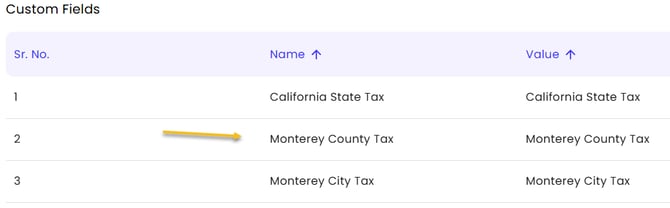
- Note the custom fields:
- Go to rules engine > add new rule.
- Choose map item sales tax as the action.
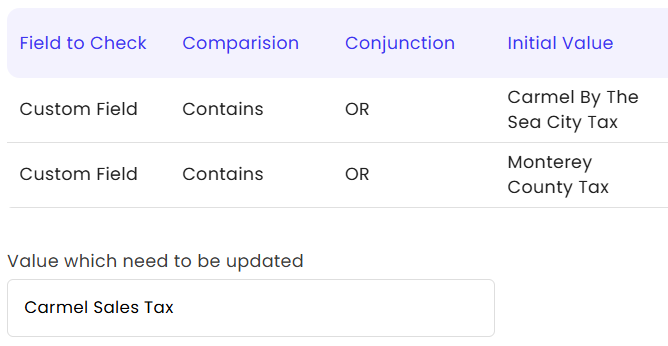
- Enter custom field, equals Monterey County Tax.
- In the map to, enter Carmel City Tax: