![Connex_Logo_HelpCenter_100h.png]](https://help.connexecommerce.com/hs-fs/hubfs/Connex_Logo_HelpCenter_100h.png?height=50&name=Connex_Logo_HelpCenter_100h.png)
What systems are compatible?
Our ERPAG integration can pull sales orders and sync them with a 3rd party system we support. Here is a list of systems:
- ShipStation
- ShipRush
- ShipWorks
In this example, we will show ShipStation.
How do I set up the integration?
Here are the steps:
- Login to Connex for QuickBooks.
- Click add selling channel
- Add ERPAG.
- Click dashboard and add ShipStation.
- We will have a user interface to pair ERPAG and ShipStation in Q1 2025. For now, please contact us.
How does the integration work?
Here is how it works:
- Connex will download orders into the Connex database. Go to pending order > pending transactions to see the orders.
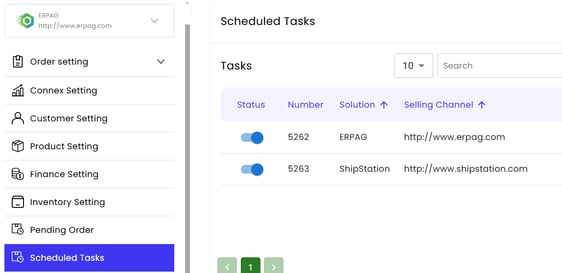
- A scheduled task picks up the sale and syncs it to ShipStation:
How do fields map?
Here is a table:
| ERPAG | ShipStation | Notes |
| Number | Order Number | We use invoice number, if supplied. Otherwise, we map order number. |
| Invoice Date | Order Date | |
| Creation Date | Order Date | We use the date the sales order was created, if no invoice is supplied. |
| Billing Address | Billing Address | |
| Shipping Address | Shipping Address | |
| Line Item Description | Item Name | |
| Line Item Qty | Item Quantity | |
| Line Item Unit Price | Item Unit Price | |
| Line Item Discount | Unit Price | Subtracted from the unit price and not listed as a separate item. |
| Line Item Tax | Tax Paid | We map tax, but ShipStation has no field. |
| Order Total | Amount Paid |
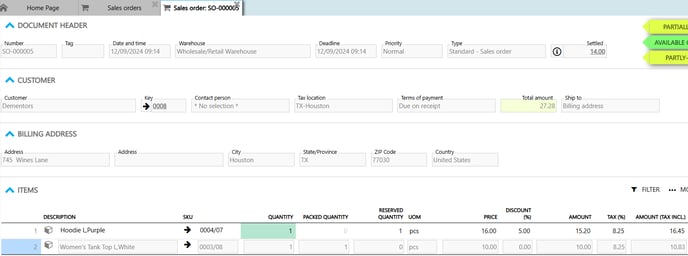
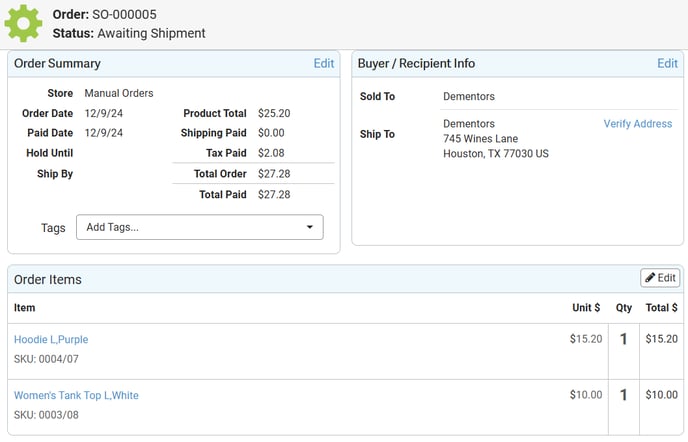
Here are screenshots: