![Connex_Logo_HelpCenter_100h.png]](https://help.connexecommerce.com/hs-fs/hubfs/Connex_Logo_HelpCenter_100h.png?height=50&name=Connex_Logo_HelpCenter_100h.png)
Is there a demo?
Here is a demo:
What systems are compatible?
Amazon and Shopify are compatible.
Is this feature available on all plans?
You must have the platinum plan.
How does it work?
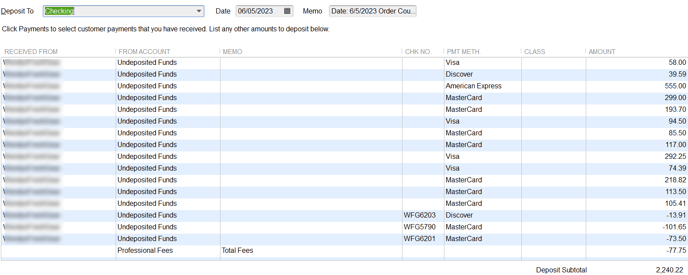
Connex will download a payout, locate the matching sales in undeposited funds and Connex will add the fees. Here is the end result:
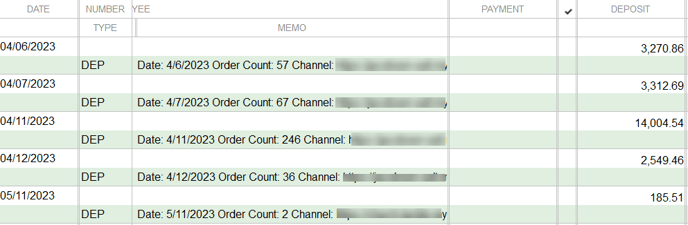
Here is the details page:
How do I set-up the deposit match?
Here are the steps:
- Login to Connex.
- Click settings > order setting > match deposit.
- Enter the settings:
- Date range of payout is dates when payouts were deposited into QuickBooks.
- Deposit account is a checking account. This is where sales from undeposited funds are grouped and sent to QuickBooks.
- Fee account is the expense account for merchant fees.
How do I deactivate the tool?
On the deposit match settings page, click the deactivate button.