![Connex_Logo_HelpCenter_100h.png]](https://help.connexecommerce.com/hs-fs/hubfs/Connex_Logo_HelpCenter_100h.png?height=50&name=Connex_Logo_HelpCenter_100h.png)
How do assembly items sync from QuickBooks Desktop to Connex Ecommerce Analytics?
Here are the steps to sync an item:
- Pair Connex Ecommerce Analytics and QuickBooks.
- In QuickBooks Desktop, go to lists > item list.
- Click new.
- Create an inventory part. In the item name / number field, enter PUMA9099200. Enter an income, COGS, and inventory asset account:
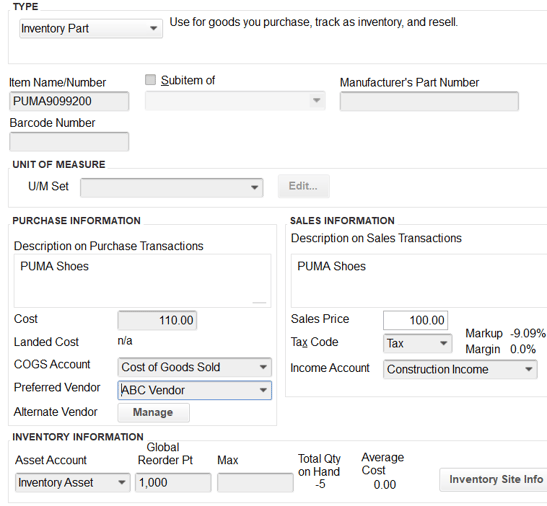
- Click OK to save the item.
- Click item > new.
- Create an assembly item.
- In the item name / number field, enter abc.
- In bill of materials, add PUMA9099200:
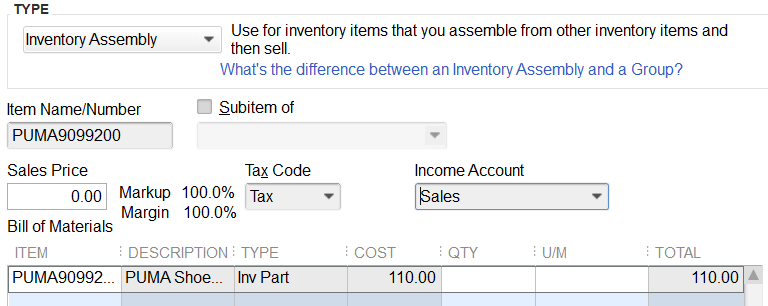
- Click OK to save.
- Run your web connector.
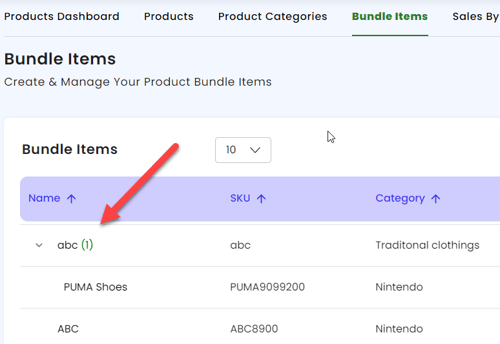
- In Connex, go to products > bundled items.
- Verify the item abc exists: