![Connex_Logo_HelpCenter_100h.png]](https://help.connexecommerce.com/hs-fs/hubfs/Connex_Logo_HelpCenter_100h.png?height=50&name=Connex_Logo_HelpCenter_100h.png)
Problem
Payments fail to sync to QuickBooks.
Description
Your orders are paid in your selling channel, but the sale is unpaid in QuickBooks.
Solutions
Sale paid on terms
If your sales are paid by credit card at the time of sale, skip to the next step.
If your sales are paid on terms, you must sync the sale before and after payment. By default, Connex syncs sales when they are first created. Instruct Connex to seek these payments:
- Log into Connex.
- Click settings.
- Click orders to QuickBooks on the top left.
- Under order statuses, enter paid, pending.
- Click save.
Settings say no payments
You instructed Connex to sync sales without payments:
- Log into Connex.
- Click settings.
- Click orders to QuickBooks on the top left.
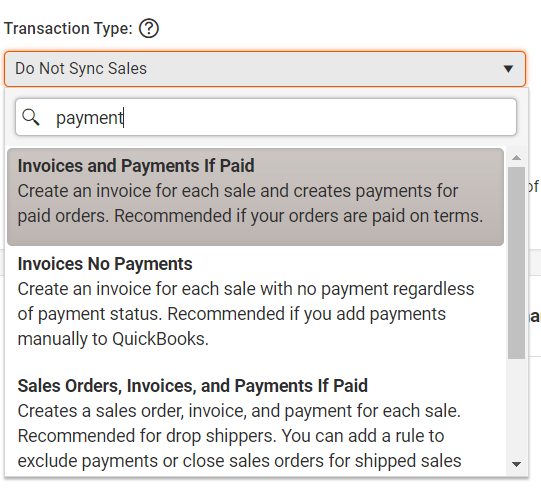
- Scroll down to transaction mode.
- Ensure it says an option with the word payments. If you chose sales receipts or sales orders, then no payments would sync:
Sale failed to sync
Check QuickBooks for the invoice or sales order. If it is missing, log into Connex. Click manual sync and resync your sale. Scroll down and check the logs. If the sale fails to sync, then the payment will fail.
Invoice has no balance
If your sale has a 100% discount, then Connex will sync no payment. Open the sale in QuickBooks and ensure the invoice has a balance.
Split Payments
Connex will sync both payments, if the dates and amounts are different.