![Connex_Logo_HelpCenter_100h.png]](https://help.connexecommerce.com/hs-fs/hubfs/Connex_Logo_HelpCenter_100h.png?height=50&name=Connex_Logo_HelpCenter_100h.png)
Problem
Your inventory sync from QuickBooks to Shopify fails.
Description
Your Connex logs shows this error:
Error updating product. SKU: MCS14. Price: 0.00. Name: MCS14. Stock -335. Error: Request failed with status code UnprocessableEntity: unknown {"errors":["Inventory item does not have inventory tracking enabled"]}
Solution
Enable inventory management
Here are the steps:
- Log into Shopify.
- Open the product.
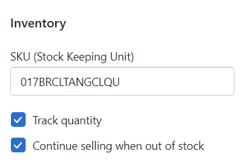
- Check the track quantity box:
- In QuickBooks, open the product.
- Make a change to the description.
- Click save.
- Run your web connector.