![Connex_Logo_HelpCenter_100h.png]](https://help.connexecommerce.com/hs-fs/hubfs/Connex_Logo_HelpCenter_100h.png?height=50&name=Connex_Logo_HelpCenter_100h.png)
Problem
You cannot sync sales.
Description
This error can happen for two reasons:
- When QuickBooks is closed, the QuickBooks Web Connector tries to sign in as a user. Go to edit > preferences > integrated applications. Click properties to find the user.
- You have two different company files on the same machine. You opened a file different than the one paired with Connex. Close one of the QuickBooks by going to file and clicking exit. You can only sync with one file at a time.
If a user logs into QuickBooks as admin, then the sync will resume. No sync timers are updated, unless the sync was successful.
Solutions
Pair as another user
Read this guide on auto syncing using remote machines.
When the company file is closed, the web connector tries to open it and sign in as another user. If that user is already signed into QuickBooks on another machine, the sync fails.
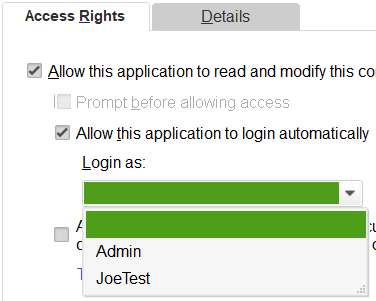
- In QuickBooks, go to edit > preferences > integrated applications.
- Next to Connex, click properties.
- Create a user that no one users to sign in. Give the user the proper permissions to sync.
- In the drop down, choose another user:
Close QuickBooks Completely and Restart
If you have QuickBooks open twice, a window with the phrase secondary will appear. Close the other QuickBooks:
