![Connex_Logo_HelpCenter_100h.png]](https://help.connexecommerce.com/hs-fs/hubfs/Connex_Logo_HelpCenter_100h.png?height=50&name=Connex_Logo_HelpCenter_100h.png)
Problem
You cannot sync sales to QuickBooks. You get this error:
Error 3140 : While trying to Add a(n) Invoice with order number of 3000021810, QB responded There is an invalid reference to QuickBooks AR Account "Accounts Receivable - CAD" in the Invoice. QuickBooks error message: The currency of the account must be either in home currency or the transaction currency.
Description
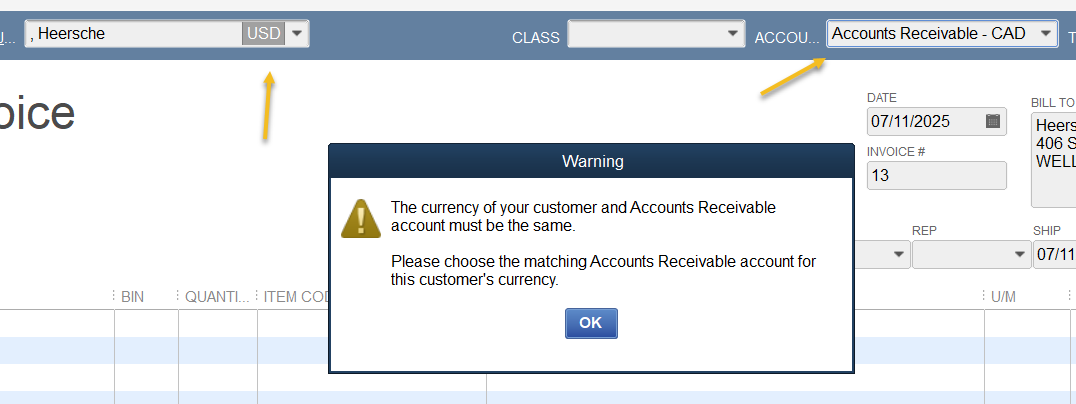
Your QuickBooks customer currency code must match the currency code of the sale. Here is a USD customer trying to use a CAD A/R account:
Solution
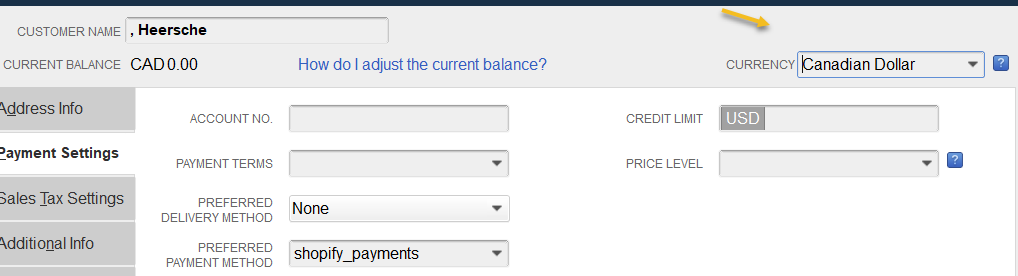
Change the customer currency code
In this example, we will change the currency code from USD to CAD. Here are the steps:
- In QuickBooks, go to customer center.
- Open the customer record.
- On the top right, change the currency code:
Map the proper A/R account
You must map an A/R account for CAD sales:
- Go to the Connex rules engine.
- Click add new rule.
- As the action, choose map A/R account.
- In the conditions, add these values: Currency Code, Equals, CAD.
- In the map to field, enter Accounts Receivable - CAD.
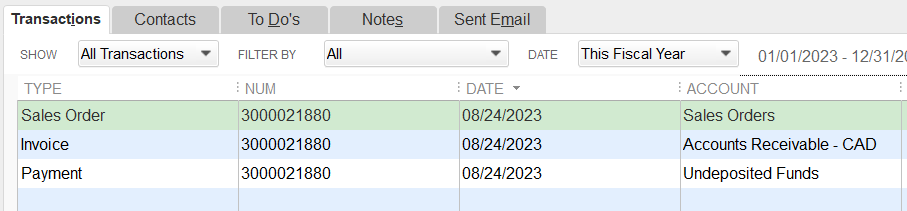
Here is the end result in QuickBooks:
Rename the customer
In QuickBooks, double click the customer. Put a 2 before the name. Resync your order. Connex will create a new customer with the correct currency code.