![Connex_Logo_HelpCenter_100h.png]](https://help.connexecommerce.com/hs-fs/hubfs/Connex_Logo_HelpCenter_100h.png?height=50&name=Connex_Logo_HelpCenter_100h.png)
Problem
Orders do not sync because the customer is missing from QuickBooks. Connex is unable to create the customer.
Description
Here is an example:
There is an invalid reference to QuickBooks Customer "Vazquez, Fernando" in the SalesReceipt. QuickBooks error message: Invalid argument. The specified record does not exist in the list.
Solution
Locate the exact error
To locate the exact error, click the sync activity log in Connex. Click error. Under search, enter customer. Hover over the error:

Check if customer was deleted
In QuickBooks, go to customer center. Show all inactive customers. Search for the customer. If the customer is inactive, then reactivate the account.
Check if customer is an employee or vendor
The customer being created matches a vendor or employee in QuickBooks. Go to the vendor or employee list in QuickBooks. Find the matching record and change the name, like Shopify (Vendor).
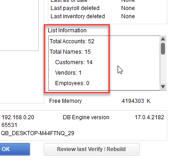
Max customer limit reached
QuickBooks has a max customer limit that you might have exceeded. Try creating a new customer. Press F2 in QuickBooks. Look under list information: