![Connex_Logo_HelpCenter_100h.png]](https://help.connexecommerce.com/hs-fs/hubfs/Connex_Logo_HelpCenter_100h.png?height=50&name=Connex_Logo_HelpCenter_100h.png)
Problem
You are unable to map the inventory site field in QuickBooks.
Description
On a QuickBooks sale, QuickBooks says unspecified site in the site drop down: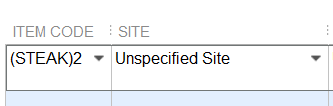
Solutions(s)
Map an inventory site using a setting or a rule
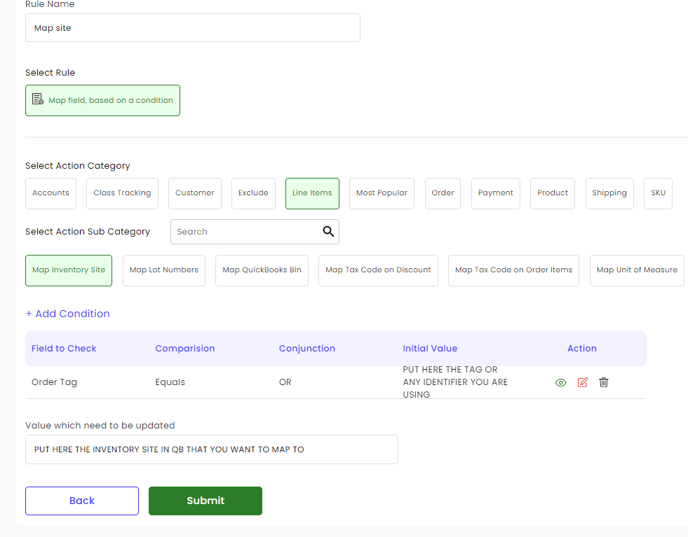
You are sending no value to the site field. You can enter a default site and use a rule. You could say if the order tag is Boston, then map Boston as the site.
Permissions
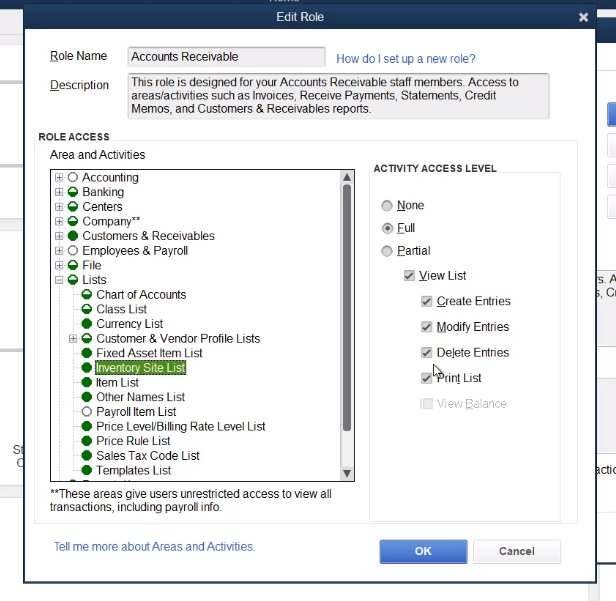
Connex will only sync a site, if it already exists. If you mapped the field and you are syncing as a non-admin, ensure you have the proper permissions:
- In QuickBooks, go to company > users > set up users and role.
- Locate the role for the user that is signed into QuickBooks.
- Go to lists > inventory site site.
- Click full:
Ensure the inventory site in QuickBooks that you mapped exists
If you added a rule, to go the rules engine. Ensure the rule maps to a site that exists. In this example, the rule maps the site to Amazon FBA and the site Amazon FBA is missing from QuickBooks:
What fields can I compare?
Here are some possibilities:
- You can say if the order has tag A, then map tag A to QuickBooks.
- You could say if Shopify SKU is ABC, then map warehouse A to QuickBooks.
- If product SKU contains a phrase, then map warehouse A to QuickBooks.
- If order number has a prefix, then map warehouse A to QuickBooks.