![Connex_Logo_HelpCenter_100h.png]](https://help.connexecommerce.com/hs-fs/hubfs/Connex_Logo_HelpCenter_100h.png?height=50&name=Connex_Logo_HelpCenter_100h.png)
What is the cause of this error?
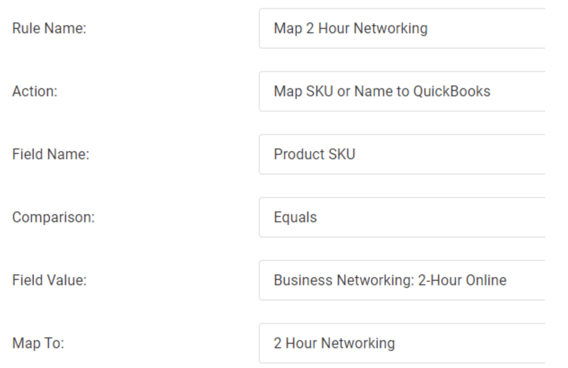
If your product contains a colon, then Connex will fail to sync the item or match it properly in QuickBooks. You must map this item to a different product:
- Login to Connex.
- On the right, click rules engine.
- Click action > add new rule.
- As the action, choose map SKU.
- Enter the Map From and Map To values.
Can't find what you're looking for? Let us help you right now!